
Download Toolsmart Humanize AI – AI Text Humanizer, Free Online Writing Assistant
Overview
In an era where AI‑generated content is becoming the norm, the biggest challenge is still making that content sound genuinely human. Toolsmart Humanize AI steps into this gap as a web‑based writing assistant that refines AI‑produced text, turning robotic phrasing into natural, engaging language. Whether you’re drafting a quick email, polishing a blog post, or preparing an academic report, Humanize AI offers a seamless way to improve tone, clarity, and fluency without the need for extensive manual editing.
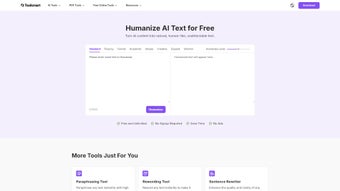
The platform’s eight customizable modes let you dial the output toward simplicity, creativity, formality, or scholarly rigor, while an adjustable intensity slider gives you precise control over how “human” the final text feels. Because it runs entirely in the browser, you can access the tool from any device—Windows laptops, macOS desktops, Android phones, or iOS tablets—making it a versatile addition to any writer’s toolkit. The service is free to start, with optional premium upgrades for higher‑volume users, and it follows industry‑standard security practices to keep your data safe.
In short, Toolsmart Humanize AI transforms raw AI output into polished, reader‑friendly copy, helping you maintain a professional voice while saving time.
Key Features of Toolsmart Humanize AI
- Eight Adaptive Writing Modes: Choose from Simple, Creative, Formal, Academic, Conversational, Technical, Persuasive, and Narrative to match the exact style you need.
- Intensity Slider: Fine‑tune the level of humanization from subtle polish to a complete rewrite, giving you full control over tone and flow.
- Real‑Time Preview: Watch the transformation happen instantly as you type, allowing quick adjustments without re‑submitting the whole text.
- Multi‑Platform Access: Browser‑based interface works on Windows, macOS, Linux, ChromeOS, Android, and iOS—no download required.
- Context‑Aware Suggestions: The AI analyzes sentence structure, lexical choice, and readability to suggest improvements that sound natural.
- Secure Data Handling: All text is processed over HTTPS and is not stored permanently, ensuring privacy for confidential documents.
- Export Options: Download the refined text as plain .txt, .docx, or copy directly to clipboard for immediate use.
- Integration Ready: Simple API endpoints let developers embed Humanize AI capabilities into their own applications or CMS platforms.
Installation, Setup & Compatibility
One of the biggest advantages of Toolsmart Humanize AI is that it eliminates the traditional installation headache. Because the service is fully web‑based, you simply navigate to the official website, create a free account, and you’re ready to start transforming text. The sign‑up process takes less than a minute—just an email address and a password, or you can use single‑sign‑on via Google or Microsoft accounts for added convenience.
After logging in, the dashboard presents a clean, distraction‑free editor. Paste your AI‑generated draft into the input box, select the desired mode from the dropdown menu, and adjust the intensity slider to your liking. The “Humanize” button processes the text in seconds, and the refined version appears side‑by‑side for easy comparison. For power users, the settings panel allows you to save custom mode‑intensity presets, making repetitive tasks faster.
Compatibility: Web browser (compatible with Chrome, Firefox, Edge, Safari, and Opera on Windows, macOS, Linux, ChromeOS, Android, and iOS). Because everything runs in the cloud, there are no system‑specific binaries or background services to manage. All you need is an internet connection and a modern browser that supports JavaScript ES6.
If you prefer offline access, the premium plan offers a lightweight desktop wrapper built on Electron, which packages the web app into a native Windows or macOS executable. Installation follows the standard drag‑and‑drop or installer routine, after which the same feature set is available without an active internet connection—ideal for secure environments where data cannot leave the local network.
Pros and Cons
Pros
- Free tier provides generous daily usage limits, perfect for occasional writers.
- Eight distinct writing modes cover a wide range of professional and creative scenarios.
- Real‑time preview speeds up the editing workflow.
- Cross‑platform accessibility ensures you can work from any device.
- Strong privacy policy with HTTPS encryption and no permanent storage of user content.
- API integration expands the tool’s usefulness beyond the web UI.
Cons
- Free version caps the number of characters per day, which may be limiting for high‑volume content creators.
- While the web UI is intuitive, power users might miss advanced grammar‑checking features found in dedicated editors.
- Offline desktop wrapper is only available for premium subscribers.
- Performance can vary on slower internet connections because processing occurs in the cloud.
Frequently Asked Questions
Is Toolsmart Humanize AI really free to use?
Yes, the platform offers a free tier that allows up to 10,000 characters per day. This is sufficient for most casual writers, students, and small‑business owners. Premium plans unlock higher limits, priority processing, and the offline desktop wrapper.Can I use Humanize AI for confidential business documents?
Absolutely. All data is transmitted over encrypted HTTPS, and the service does not retain a permanent copy of your text. For organizations with strict compliance needs, the premium plan includes a “no‑log” option and can be deployed on a private cloud.How does the intensity slider affect the output?
The slider controls how aggressively the AI rewrites the input. At low settings, the tool makes subtle adjustments—fixing minor phrasing issues while preserving most of the original structure. At high settings, it performs a near‑complete rewrite, optimizing flow, tone, and readability for a fully human‑like feel.Do I need any special plugins or extensions?
No additional software is required for the web version. All modern browsers support the tool out‑of‑the‑box. If you opt for the desktop wrapper, it installs as a standard Windows or macOS application.Is there an API for developers?
Yes, Toolsmart offers a RESTful API that lets developers send text to the Humanize engine and receive the transformed output. Documentation, example code, and API keys are available in the developer portal for both free and paid plans.Conclusion & Call to Action
Toolsmart Humanize AI fills a critical niche in the content‑creation workflow: making AI‑generated text sound genuinely human. Its blend of eight adaptive modes, an intuitive intensity slider, and a secure, browser‑based interface makes it a compelling choice for anyone who writes regularly—be it marketers, students, academics, or busy professionals. While the free tier’s character limit may require an upgrade for power users, the overall value proposition is strong, especially when compared with bulkier desktop editors that lack the same level of contextual nuance.
Ready to give your AI drafts a human touch? Download Toolsmart Humanize AI now and start polishing your content instantly—no installation, no hassle, just a smoother, more natural reading experience.



.png)



